---
title: "DSP audiences: Standard mode, Smart Audiences and product audiences"
description: "How audience targeting works in DSP strategies: Amazon catalog audiences, one-click Smart Audiences and your own product audiences."
---
[Skip to content](https://help.m19.com/dsp-audiences-standard-mode-smart-audiences-and-product-audiences#main-content)
English
Show submenu for translations
[Need more help?](https://help.m19.com/kb-tickets/new)
![m19-transparent.png\]](https://help.m19.com/hs-fs/hubfs/m19-transparent.png?height=50&name=m19-transparent.png)
Open main navigation
Close main navigation
- English
Show submenu for translations
- [Need more help?](https://help.m19.com/kb-tickets/new)
- [m19.com](https://www.m19.com/)
[m19.com](https://www.m19.com/)
Help will always be given at M19 to those who ask for it.
- There are no suggestions because the search field is empty.
1. [Help Center](https://help.m19.com/)
2. [Dashboard & Features 💻](https://help.m19.com/dashboard-features)
3. [Strategies](https://help.m19.com/dashboard-features#strategies)
# DSP audiences: Standard mode, Smart Audiences and product audiences
## How audience targeting works in DSP strategies: Amazon catalog audiences, one-click Smart Audiences and your own product audiences.
Consideration and Conversion strategies target audiences in one of three ways, chosen in the Audiences step of the strategy.
### Smart Audience: one click
Presets whose audiences are created automatically from the ASINs of the strategy:
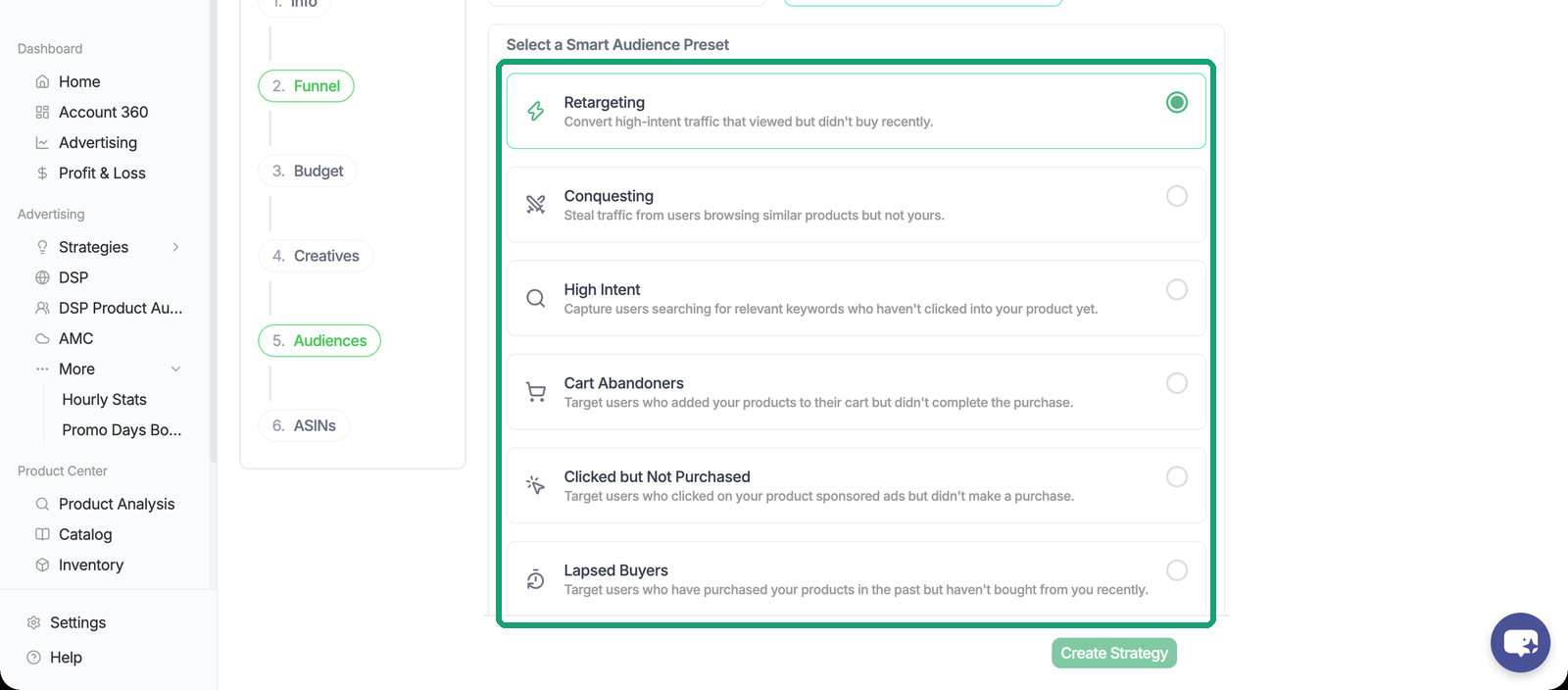
- Retargeting: shoppers who viewed your products without buying.
- Conquesting: shoppers who browsed similar products but not yours.
- High Intent: shoppers who searched for your products without clicking.
- Three presets powered by Amazon Marketing Cloud: Cart Abandoners, Clicked but Not Purchased, Lapsed Buyers.
The logic of each preset is detailed in [Smart Audiences for DSP Strategies](https://help.m19.com/smart-audiences-for-dsp-strategies).
### Standard mode: the Amazon audience catalog
Pick from close to 7,000 Amazon segments (Demographic, In-market, Interest, Lifestyle, Life event, Custom-built), with the Amazon audience fee displayed for each. A strategy can combine up to two groups of 25 audiences (OR within a group, AND between groups), plus a blacklist of excluded audiences. Excluded audiences can take 48 hours or more to fully propagate.
### Product audiences built on your ASINs
You can also build your own audiences on a list of ASINs, and reuse them across strategies. From Advertising \> DSP Product Audiences, click Create audience:
1. Name the audience.
2. Pick ASINs from your catalog, or paste ASINs that are not in it (competitor ASINs, for example).
3. Choose the shopper behaviour: Product views (viewed one of the ASINs), Product purchases (bought one of them), Product searches (searched for terms associated with them) or Similar product views (viewed products similar to them, the basis for conquesting).
4. Choose the lookback window, from 7 to 365 days: how far back Amazon looks for that behaviour. A short window gives a smaller, hotter audience; a long window gives more reach and weaker intent.
5. Create, then wait for Amazon. The audience shows as Pending while Amazon builds it, and can be added to a strategy once it is Active.
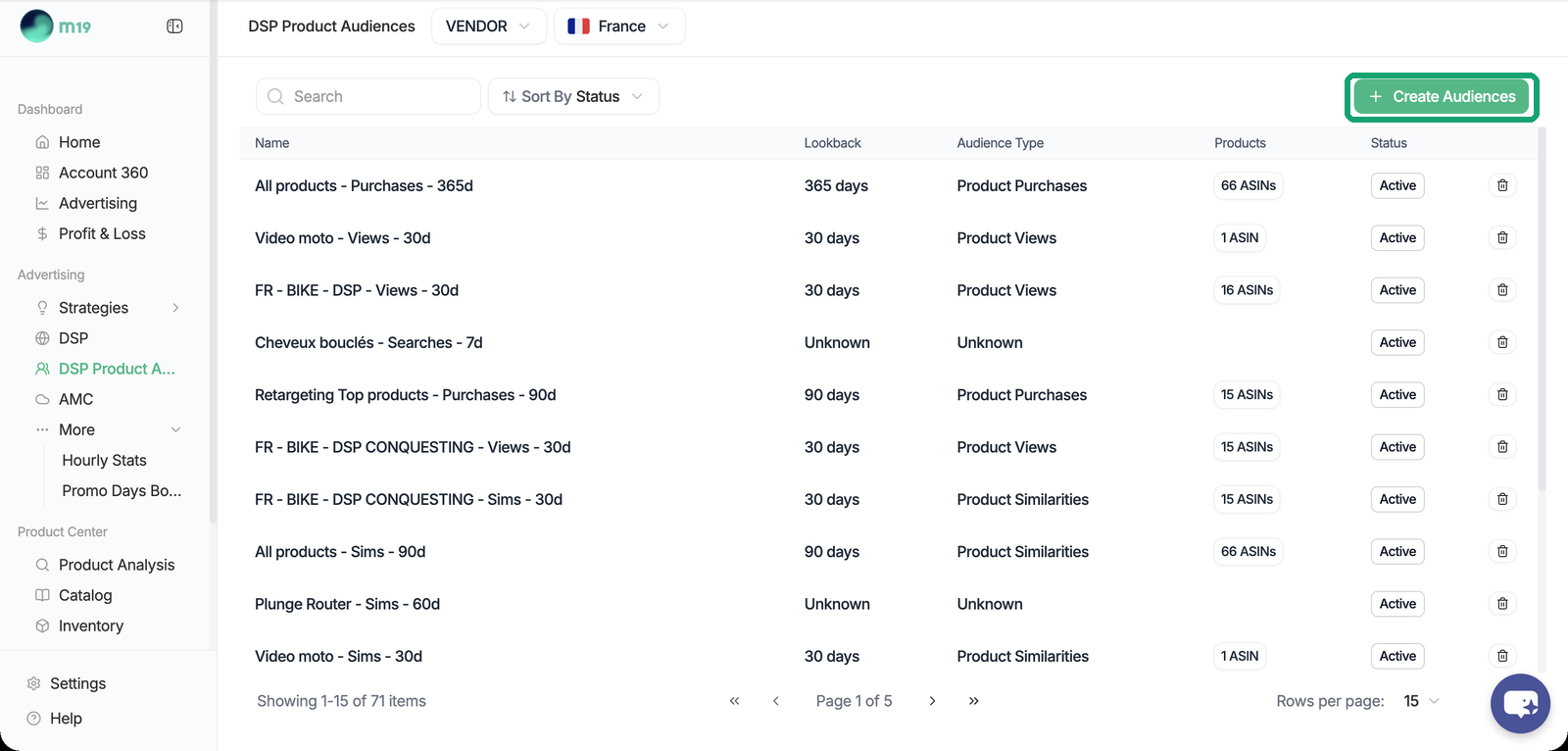
You can select several behaviours and several lookbacks at once: m19 creates one audience per combination. For example, Product views at 14 and 30 days plus Product purchases at 30 days gives three audiences you can mix independently. These audiences appear in Standard mode. An audience cannot be deleted while a strategy uses it.
### Awareness strategies
Streaming TV strategies have no Audiences tab: Amazon picks who sees the ad. On Prime Video deals, Amazon audiences are optional.
If Amazon returns "Unknown error occurred while creating audience" when you create a strategy, the audience is probably too small: widen it or change the ASINs.
- [Admin ⚙️](https://help.m19.com/admin-%EF%B8%8F#main-content)
- [Account](https://help.m19.com/admin-%EF%B8%8F#account)
- [Billing](https://help.m19.com/admin-%EF%B8%8F#billing)
- [Getting Started 🚀](https://help.m19.com/getting-started#main-content)
- [M19 Encyclopedia](https://help.m19.com/getting-started#m19-encyclopedia)
- [Dashboard & Features 💻](https://help.m19.com/dashboard-features#main-content)
- [Strategies](https://help.m19.com/dashboard-features#strategies)
- [Products](https://help.m19.com/dashboard-features#products)
- [Metrics](https://help.m19.com/dashboard-features#metrics)
- [Traffic management](https://help.m19.com/dashboard-features#traffic-management)
- [Budget management](https://help.m19.com/dashboard-features#budget-management)
- [Events](https://help.m19.com/dashboard-features#events)
- [Tools](https://help.m19.com/dashboard-features#tools)
- [New Features](https://help.m19.com/dashboard-features#new-features)
- [Analysis & Performance Hub 🧠](https://help.m19.com/analysis-performance-hub#main-content)
- [Catalog](https://help.m19.com/analysis-performance-hub#catalog)
- [Strategies and campaigns](https://help.m19.com/analysis-performance-hub#strategies-and-campaigns)
- [Data wrangling](https://help.m19.com/analysis-performance-hub#data-wrangling)
- [Amazon Connections ⛓️](https://help.m19.com/amazon-connections-%EF%B8%8F)
- [Best practices 👑](https://help.m19.com/best-practices#main-content)
- [Advanced Strategies](https://help.m19.com/best-practices#advanced-strategies)
- [Analysis](https://help.m19.com/analysis)
- [Updates and New Releases](https://help.m19.com/updates-and-new-releases)
[](https://www.m19.com/)
Copyright © 2026, m19