---
title: "DSP creatives: Responsive eCommerce, custom banners and video"
description: Which creative formats a DSP strategy can use, and how to set them up in m19.
---
[Skip to content](https://help.m19.com/dsp-creatives-responsive-ecommerce-custom-banners-and-video#main-content)
English
Show submenu for translations
[Need more help?](https://help.m19.com/kb-tickets/new)
![m19-transparent.png\]](https://help.m19.com/hs-fs/hubfs/m19-transparent.png?height=50&name=m19-transparent.png)
Open main navigation
Close main navigation
- English
Show submenu for translations
- [Need more help?](https://help.m19.com/kb-tickets/new)
- [m19.com](https://www.m19.com/)
[m19.com](https://www.m19.com/)
Help will always be given at M19 to those who ask for it.
- There are no suggestions because the search field is empty.
1. [Help Center](https://help.m19.com/)
2. [Dashboard & Features 💻](https://help.m19.com/dashboard-features)
3. [Strategies](https://help.m19.com/dashboard-features#strategies)
# DSP creatives: Responsive eCommerce, custom banners and video
## Which creative formats a DSP strategy can use, and how to set them up in m19.
Nothing needs to be produced to start a Display strategy. Here is what each creative type is and where it is managed.
### Display: Responsive eCommerce, generated per ASIN
Amazon builds a banner automatically from the product page (image, title, price, stars, Shop now button), in every size, localized on multilingual marketplaces. One creative is generated per ASIN of the strategy.
In the Creatives tab of the strategy you can customize a headline (50 characters) and a brand logo, with a live preview. The toggle "Always keep using Responsive eCommerce" keeps this creative alongside your custom banners.
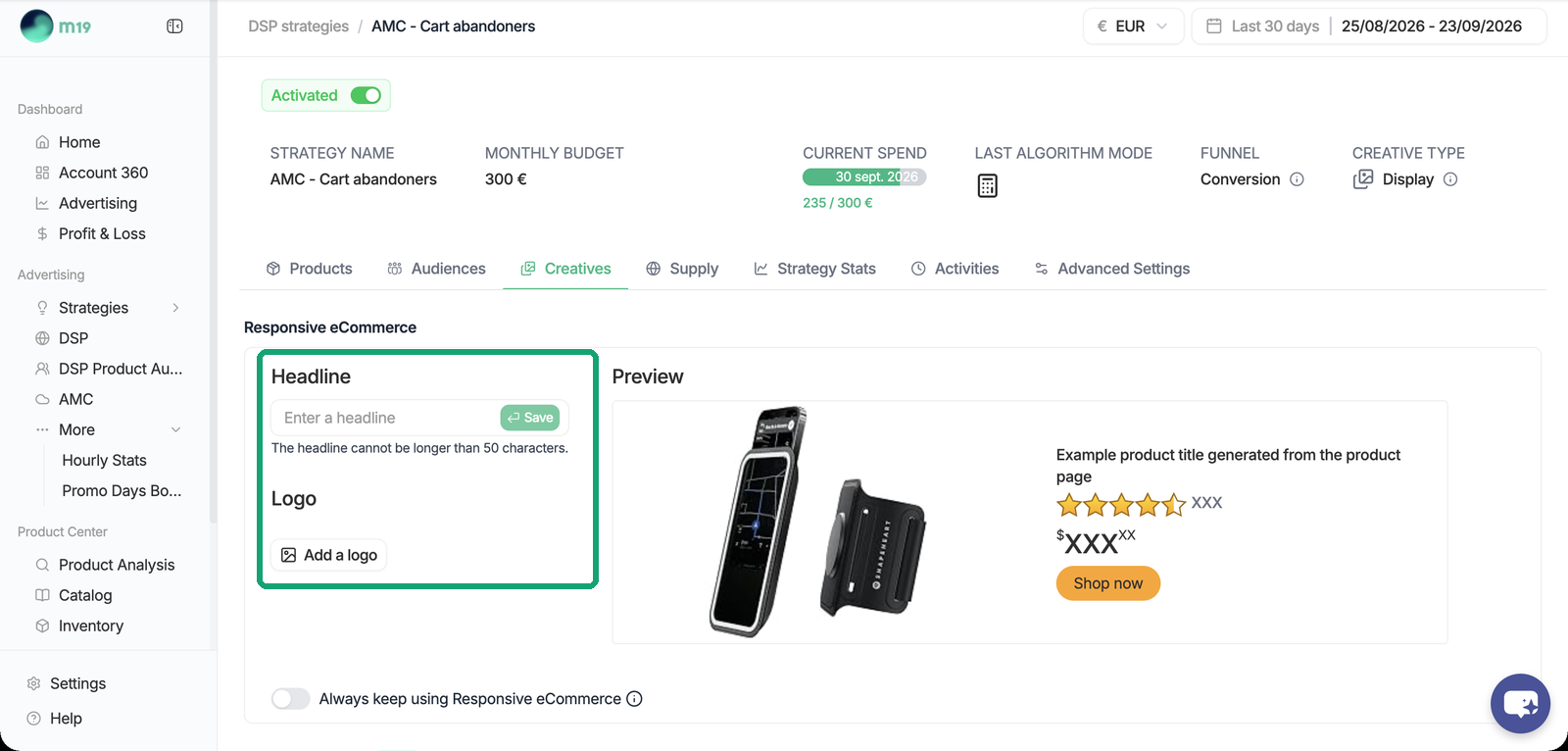
The preview is a template, not the exact ad shoppers will see. Creatives are generated per ASIN whatever the order of the ASINs in the strategy.
### Custom banners
Your own display creatives (standard IAB sizes) can be added on top of a Display strategy. Custom banners are uploaded and processed in the Amazon DSP console first; m19 then retrieves them and lets you select them with Add creatives or Add a Custom Creative, searchable by name or ASIN. m19 does not build or design banners. If a banner does not appear in m19, first check that it is fully uploaded and processed in the Amazon DSP console.
### Video
On Consideration and Conversion strategies, the Video creative type serves online video inside web and app content (Amazon store and app, Twitch, IMDb, publisher sites), not on TV. One video per strategy, uploaded from the board. Same audiences and same bidding as Display.
Streaming TV and Prime Video videos are reserved to Awareness strategies and are also uploaded from the board. See [How do I create a DSP strategy?](https://help.m19.com/how-do-i-create-a-dsp-strategy)
The creative type (Display or Video) can be changed on an existing strategy.
### Creative review by Amazon
Once a creative is uploaded, the review is handled entirely by Amazon. Its feedback is shown in the Creatives tab: Rejected or Partially rejected, Amazon's message, the policy concerned and the number of impacted ads. m19 cannot speed up or override a review. If a creative is rejected although it meets Amazon's specifications, contact Amazon Ads support to request a manual review.
- [Admin ⚙️](https://help.m19.com/admin-%EF%B8%8F#main-content)
- [Account](https://help.m19.com/admin-%EF%B8%8F#account)
- [Billing](https://help.m19.com/admin-%EF%B8%8F#billing)
- [Getting Started 🚀](https://help.m19.com/getting-started#main-content)
- [M19 Encyclopedia](https://help.m19.com/getting-started#m19-encyclopedia)
- [Dashboard & Features 💻](https://help.m19.com/dashboard-features#main-content)
- [Strategies](https://help.m19.com/dashboard-features#strategies)
- [Products](https://help.m19.com/dashboard-features#products)
- [Metrics](https://help.m19.com/dashboard-features#metrics)
- [Traffic management](https://help.m19.com/dashboard-features#traffic-management)
- [Budget management](https://help.m19.com/dashboard-features#budget-management)
- [Events](https://help.m19.com/dashboard-features#events)
- [Tools](https://help.m19.com/dashboard-features#tools)
- [New Features](https://help.m19.com/dashboard-features#new-features)
- [Analysis & Performance Hub 🧠](https://help.m19.com/analysis-performance-hub#main-content)
- [Catalog](https://help.m19.com/analysis-performance-hub#catalog)
- [Strategies and campaigns](https://help.m19.com/analysis-performance-hub#strategies-and-campaigns)
- [Data wrangling](https://help.m19.com/analysis-performance-hub#data-wrangling)
- [Amazon Connections ⛓️](https://help.m19.com/amazon-connections-%EF%B8%8F)
- [Best practices 👑](https://help.m19.com/best-practices#main-content)
- [Advanced Strategies](https://help.m19.com/best-practices#advanced-strategies)
- [Analysis](https://help.m19.com/analysis)
- [Updates and New Releases](https://help.m19.com/updates-and-new-releases)
[](https://www.m19.com/)
Copyright © 2026, m19