---
title: Audience Boost
description: Learn how to use the Audience Boost feature in m19 to apply bid modifiers for high-intent shoppers. Target standard Amazon audiences or custom AMC audiences for Sponsored Products and Brands.
---
[Skip to content](https://help.m19.com/audience-boost#main-content)
English
Show submenu for translations
[Need more help?](https://help.m19.com/kb-tickets/new)
![m19-transparent.png\]](https://help.m19.com/hs-fs/hubfs/m19-transparent.png?height=50&name=m19-transparent.png)
Open main navigation
Close main navigation
- English
Show submenu for translations
- [Need more help?](https://help.m19.com/kb-tickets/new)
- [m19.com](https://www.m19.com/)
[m19.com](https://www.m19.com/)
Help will always be given at M19 to those who ask for it.
- There are no suggestions because the search field is empty.
1. [Help Center](https://help.m19.com/)
2. [Dashboard & Features 💻](https://help.m19.com/dashboard-features)
3. [Strategies](https://help.m19.com/dashboard-features#strategies)
# Audience Boost
## Target high-intent shoppers and increase visibility by applying bid modifiers to specific user audiences.
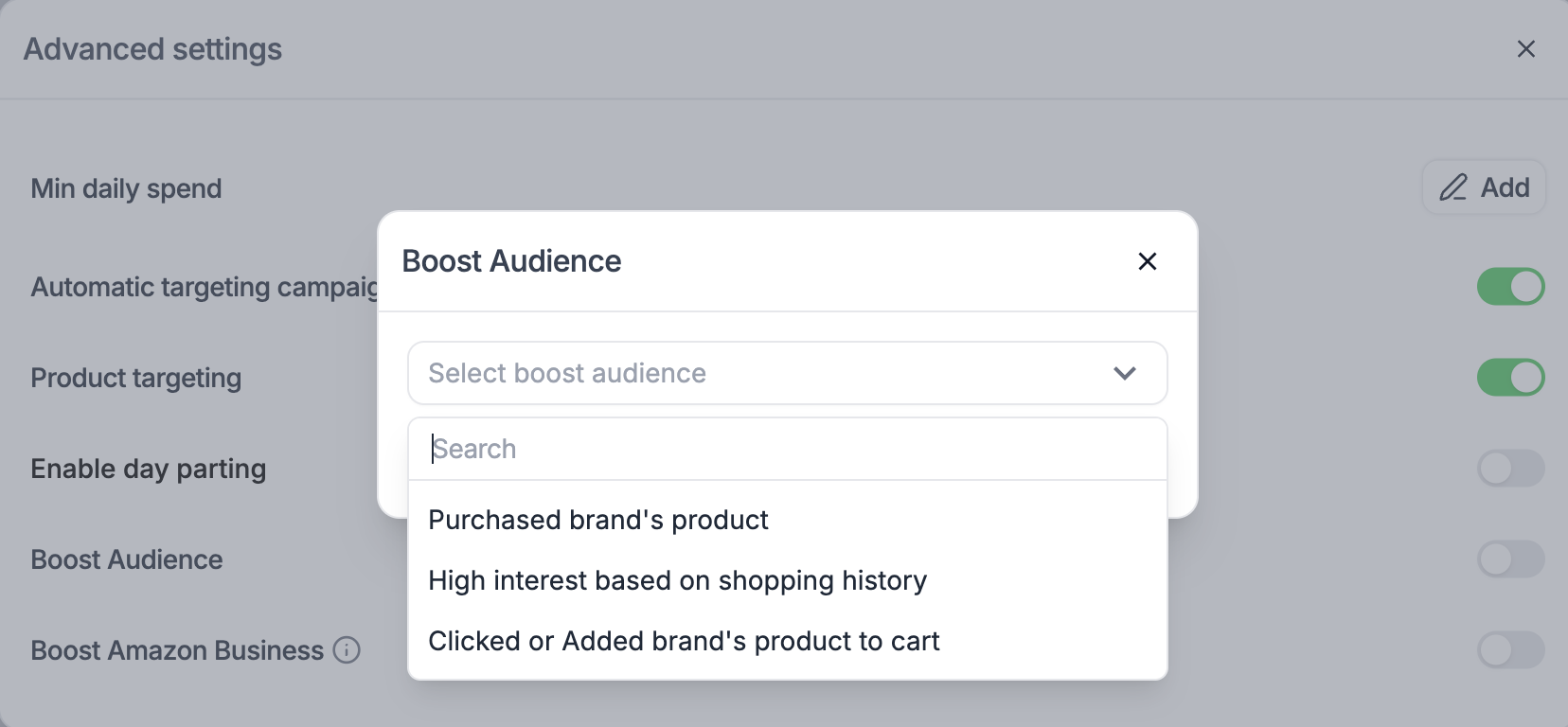
The **Audience Boost** feature allows you to refine your targeting strategy by focusing on users who are more likely to engage with your brand. By selecting a specific audience, m19 applies a bid modifier to increase your bids for those users, ensuring your ads are more competitive when it matters most.
### **Availability**
This feature is currently available for:
- **Sponsored Products (SP)**
- **Sponsored Brands (SB)**
### **How it works**
When you enable Audience Boost, you are telling the m19 algorithm to aggressively target a specific group of shoppers. The tool applies a **bid modifier**, essentially increasing the bid amount when a user from the selected audience searches for your keywords. This increases the likelihood of your ad being shown to these high-value prospects.
### **Available Audiences**
You can choose from standard Amazon audiences or your own custom audiences.
**1. Standard Amazon Audiences** m19 provides three default audiences based on Amazon's rich shopper data:
- **Purchased brand's product:** Targets shoppers who have previously bought from your brand. Ideal for driving repeat purchases and loyalty.
- **High interest based on shopping history:** Targets shoppers who have shown behavior indicating a strong interest in products similar to yours.
- **Clicked or Added brand's product to cart:** Targets "warm" leads—shoppers who viewed or carted your items but didn't check out. Ideal for remarketing.
**2. Custom AMC Audiences** If you use **Amazon Marketing Cloud (AMC)**, any custom audience you have created there will also automatically appear in the selection list. This allows for highly granular targeting based on your own custom insights.
### **How to enable Audience Boost**
You can configure this feature directly within your Strategy settings.
1. Navigate to the **Strategies** page.
2. Select the strategy you wish to edit.
3. Open the **Advanced Settings** section.
4. Locate the **Boost Audience** option.
5. Click the dropdown menu and select **one** audience from the list.
> **Note:** You can currently select only **one** audience per strategy. If you wish to target a different audience, you must switch the selection or create a separate strategy.
- [Admin ⚙️](https://help.m19.com/admin-%EF%B8%8F#main-content)
- [Account](https://help.m19.com/admin-%EF%B8%8F#account)
- [Billing](https://help.m19.com/admin-%EF%B8%8F#billing)
- [Getting Started 🚀](https://help.m19.com/getting-started#main-content)
- [M19 Encyclopedia](https://help.m19.com/getting-started#m19-encyclopedia)
- [Dashboard & Features 💻](https://help.m19.com/dashboard-features#main-content)
- [Strategies](https://help.m19.com/dashboard-features#strategies)
- [Products](https://help.m19.com/dashboard-features#products)
- [Metrics](https://help.m19.com/dashboard-features#metrics)
- [Traffic management](https://help.m19.com/dashboard-features#traffic-management)
- [Budget management](https://help.m19.com/dashboard-features#budget-management)
- [Events](https://help.m19.com/dashboard-features#events)
- [Tools](https://help.m19.com/dashboard-features#tools)
- [New Features](https://help.m19.com/dashboard-features#new-features)
- [Analysis & Performance Hub 🧠](https://help.m19.com/analysis-performance-hub#main-content)
- [Catalog](https://help.m19.com/analysis-performance-hub#catalog)
- [Strategies and campaigns](https://help.m19.com/analysis-performance-hub#strategies-and-campaigns)
- [Data wrangling](https://help.m19.com/analysis-performance-hub#data-wrangling)
- [Amazon Connections ⛓️](https://help.m19.com/amazon-connections-%EF%B8%8F)
- [Best practices 👑](https://help.m19.com/best-practices#main-content)
- [Advanced Strategies](https://help.m19.com/best-practices#advanced-strategies)
- [Analysis](https://help.m19.com/analysis)
- [Updates and New Releases](https://help.m19.com/updates-and-new-releases)
[](https://www.m19.com/)
Copyright © 2026, m19