---
title: Search trends report
description: Amazon Search Frequency Rate (SFR) is the numeric rank of any given search term’s popularity compared to other search terms during a specific time period.
---
[Skip to content](https://help.m19.com/what-is-the-search-trends#main-content)
English
Show submenu for translations
[Need more help?](https://help.m19.com/kb-tickets/new)
![m19-transparent.png\]](https://help.m19.com/hs-fs/hubfs/m19-transparent.png?height=50&name=m19-transparent.png)
Open main navigation
Close main navigation
- English
Show submenu for translations
- [Need more help?](https://help.m19.com/kb-tickets/new)
- [m19.com](https://www.m19.com/)
[m19.com](https://www.m19.com/)
Help will always be given at M19 to those who ask for it.
- There are no suggestions because the search field is empty.
1. [Help Center](https://help.m19.com/)
2. [Dashboard & Features 💻](https://help.m19.com/dashboard-features)
3. [Traffic management](https://help.m19.com/dashboard-features#traffic-management)
# Search trends report
## Amazon Search Frequency Rate (SFR) is the numeric rank of any given search term’s popularity compared to other search terms during a specific time period.
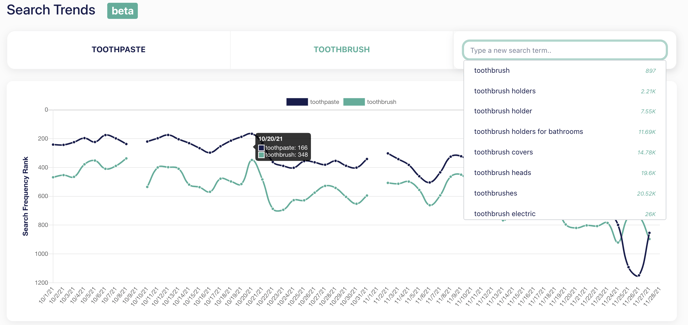
The search trends report let you :
- Compare how a search term rank across time-based on [Amazon search terms report](https://sellercentral.amazon.com/gp/help/external/5NXWNY8HUD3VDCW)
- Compare search term ranking (the higher the curve is, the closer to the top the search term is)
The report is based on Amazon Search Frequency Rate. It does not give insight into the impressions or clicks of a given keyword. Think of it as a metric of relative competition among keywords.
When the ranking of a keyword improves from one week to another (the ranking decreases but the curve goes up), it means that the keywords are more researched than it was a week ago compared to other keywords.
The lower the ranking, the more attractive a keyword is, hence the curve is higher for lower keywords.
We recommend you analyse a wide time period to better understand how keywords compete
We estimate the monthly search volume for each keyword you type!
### Quick example
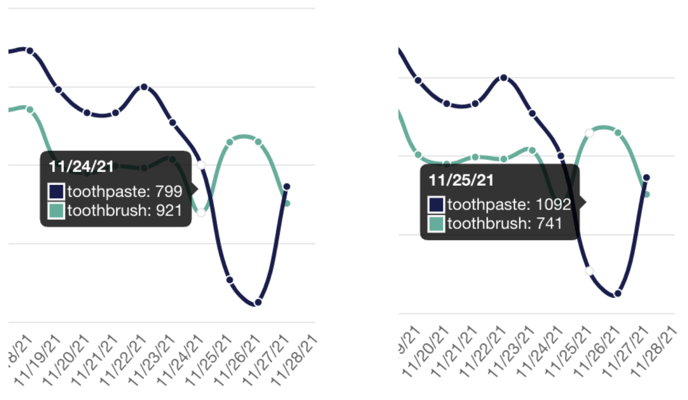
Imagine that we compare two keywords: "toothpaste" and "toothbrush" on 2021-11-24 and 2021-11-25 :
\- *toothpaste* is ranked **799** on 2021-11-24, then is ranked **1092** on 2021-11-25
\- *toothbrush* is ranked **921** on 2021-11-24, then is ranked **741** on 2021-11-25
As you can see on the curve below, *toothpaste* had a better ranking than *toothbrush* on 2021-11-24 but then it was the opposite. It means that *toothpaste* was more attractive than *toothbrush* and then *toothbrush* was more attractive.
Keep in mind that it does not reflect their impressions or clicks! *Toothpaste* being less attractive than *toothbrush* on 2021-11-25 does not mean that researches for *toothpaste* decreased ! It is possible that all Amazon researches increase for *toothbrush* but research for *toothpaste* stayed the same.
- [Admin ⚙️](https://help.m19.com/admin-%EF%B8%8F#main-content)
- [Account](https://help.m19.com/admin-%EF%B8%8F#account)
- [Billing](https://help.m19.com/admin-%EF%B8%8F#billing)
- [Getting Started 🚀](https://help.m19.com/getting-started#main-content)
- [M19 Encyclopedia](https://help.m19.com/getting-started#m19-encyclopedia)
- [Dashboard & Features 💻](https://help.m19.com/dashboard-features#main-content)
- [Strategies](https://help.m19.com/dashboard-features#strategies)
- [Products](https://help.m19.com/dashboard-features#products)
- [Metrics](https://help.m19.com/dashboard-features#metrics)
- [Traffic management](https://help.m19.com/dashboard-features#traffic-management)
- [Budget management](https://help.m19.com/dashboard-features#budget-management)
- [Events](https://help.m19.com/dashboard-features#events)
- [Tools](https://help.m19.com/dashboard-features#tools)
- [New Features](https://help.m19.com/dashboard-features#new-features)
- [Analysis & Performance Hub 🧠](https://help.m19.com/analysis-performance-hub#main-content)
- [Catalog](https://help.m19.com/analysis-performance-hub#catalog)
- [Strategies and campaigns](https://help.m19.com/analysis-performance-hub#strategies-and-campaigns)
- [Data wrangling](https://help.m19.com/analysis-performance-hub#data-wrangling)
- [Amazon Connections ⛓️](https://help.m19.com/amazon-connections-%EF%B8%8F)
- [Best practices 👑](https://help.m19.com/best-practices#main-content)
- [Advanced Strategies](https://help.m19.com/best-practices#advanced-strategies)
- [Analysis](https://help.m19.com/analysis)
- [Updates and New Releases](https://help.m19.com/updates-and-new-releases)
[](https://www.m19.com/)
Copyright © 2026, m19