---
title: Account 360
description: Learn how to navigate and utilize Account 360 for creating and customizing dashboards. Discover how to add widgets, use templates, and selectively share your views with other M19 users, ensuring tailored access for stakeholders.
---
[Skip to content](https://help.m19.com/account-360#main-content)
English
Show submenu for translations
[Need more help?](https://help.m19.com/kb-tickets/new)
![m19-transparent.png\]](https://help.m19.com/hs-fs/hubfs/m19-transparent.png?height=50&name=m19-transparent.png)
Open main navigation
Close main navigation
- English
Show submenu for translations
- [Need more help?](https://help.m19.com/kb-tickets/new)
- [m19.com](https://www.m19.com/)
[m19.com](https://www.m19.com/)
Help will always be given at M19 to those who ask for it.
- There are no suggestions because the search field is empty.
1. [Help Center](https://help.m19.com/)
2. [Updates and New Releases](https://help.m19.com/updates-and-new-releases)
# Account 360
Account 360 is a powerful visual tool designed to display key performance indicators (KPIs) and other relevant data points related to a specific marketplace. Inspired by [Product 360](https://help.m19.com/product-360), it allows you to create a variety of reports and graphs, providing a comprehensive overview of your business's health, sales performance, operational efficiency, and more.
### **What features does Account 360 offer?**
- Customizable dashboards: Create your own personalized dashboard or use our preset options.
- Comprehensive reporting: Generate detailed reports to analyze various aspects of your marketplace.
- Visual analytics: Utilize graphs and visual aids to better understand your data.
- Ability to share it with stakeholders
### Where can I find it and how can I use Account 360?
We'll show you in the following video:
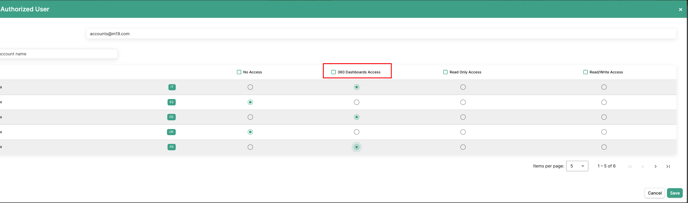
As mentioned in the video, you can selectively share this view with other M19 users without granting access to the entire account. You just need to go to settings \> User Management \> Add authorized user:
- [Admin ⚙️](https://help.m19.com/admin-%EF%B8%8F#main-content)
- [Account](https://help.m19.com/admin-%EF%B8%8F#account)
- [Billing](https://help.m19.com/admin-%EF%B8%8F#billing)
- [Getting Started 🚀](https://help.m19.com/getting-started#main-content)
- [M19 Encyclopedia](https://help.m19.com/getting-started#m19-encyclopedia)
- [Dashboard & Features 💻](https://help.m19.com/dashboard-features#main-content)
- [Strategies](https://help.m19.com/dashboard-features#strategies)
- [Products](https://help.m19.com/dashboard-features#products)
- [Metrics](https://help.m19.com/dashboard-features#metrics)
- [Traffic management](https://help.m19.com/dashboard-features#traffic-management)
- [Budget management](https://help.m19.com/dashboard-features#budget-management)
- [Events](https://help.m19.com/dashboard-features#events)
- [Tools](https://help.m19.com/dashboard-features#tools)
- [New Features](https://help.m19.com/dashboard-features#new-features)
- [Analysis & Performance Hub 🧠](https://help.m19.com/analysis-performance-hub#main-content)
- [Catalog](https://help.m19.com/analysis-performance-hub#catalog)
- [Strategies and campaigns](https://help.m19.com/analysis-performance-hub#strategies-and-campaigns)
- [Data wrangling](https://help.m19.com/analysis-performance-hub#data-wrangling)
- [Amazon Connections ⛓️](https://help.m19.com/amazon-connections-%EF%B8%8F)
- [Best practices 👑](https://help.m19.com/best-practices#main-content)
- [Advanced Strategies](https://help.m19.com/best-practices#advanced-strategies)
- [Analysis](https://help.m19.com/analysis)
- [Updates and New Releases](https://help.m19.com/updates-and-new-releases)
[](https://www.m19.com/)
Copyright © 2026, m19
```json
{
"@context" : "https://schema.org",
"@type" : "VideoObject",
"contentUrl" : "https://8861742.fs1.hubspotusercontent-na1.net/hubfs/8861742/Account%20360.mp4",
"dateModified" : "2024-06-20T16:54:55.573Z",
"duration" : "PT1M15S",
"height" : 1080,
"name" : "Account 360",
"thumbnailUrl" : "https://8861742.fs1.hubspotusercontent-na1.net/hubfs/8861742/Account%20360.mp4/medium.jpg",
"uploadDate" : "2024-06-20T16:54:55.568Z",
"width" : 1920
}
```